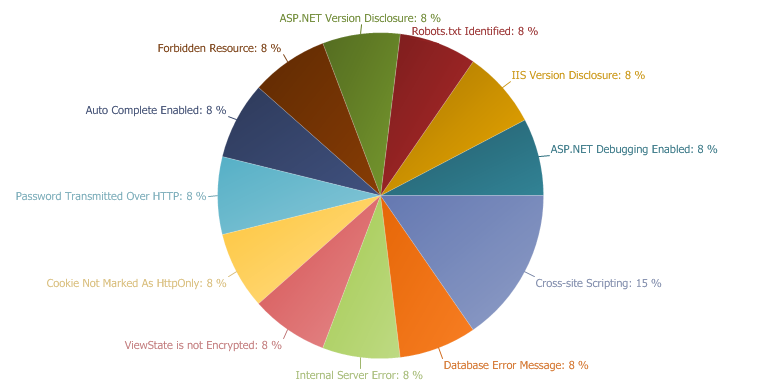
XSS (Cross-site Scripting) allows an attacker to execute a dynamic script (Javascript, VbScript) in the context of the application. This allows several different attack opportunities, mostly hijacking the current session of the user or changing the look of the page by changing the HTML on the fly to steal the user's credentials. This happens because the input entered by a user has been interpreted as HTML/Javascript/VbScript by the browser.
XSS targets the users of the application instead of the server. Although this is a limitation, since it allows attackers to hijack other users' session, an attacker might attack an administrator to gain full control over the application.
Impact
There are many different attacks that can be leveraged through the use of XSS, including:
Hi-jacking users' active session
Changing the look of the page within the victims browser.
Mounting a successful phishing attack.
Intercept data and perform man-in-the-middle attacks.
Remedy
The issue occurs because the browser interprets the input as active HTML, Javascript or VbScript. To avoid this, all input and output from the application should be filtered. Output should be filtered according to the output format and location. Typically the output location is HTML. Where the output is HTML ensure that all active content is removed prior to its presentation to the server.
Prior to sanitizing user input, ensure you have a pre-defined list of both expected and acceptable characters with which you populate a white-list. This list needs only be defined once and should be used to sanitize and validate all subsequent input.
There are a number of pre-defined, well structured white-list libraries available for many different environments, good examples of these include, OWASP Reform and Microsoft Anti Cross-site Scripting libraries are good examples.
Netsparker identified that password data is sent over HTTP.
Impact
If an attacker can intercept network traffic he/she can steal users credentials.
Actions to Take
See the remedy for solution.
Move all of your critical forms and pages to HTTPS and do not serve them over HTTP.
Remedy
All sensitive data should be transferred over HTTPS rather than HTTP. Forms should be served over HTTPS. All aspects of the application that accept user input starting from the login process should only be served over HTTPS.
//If machindID in url authenticate as managed service. if (location.href.indexOf('machineID=') != -1) self.location = "_processLogin.asp?" + location.href.split('?')[1];
var gotoParams = ""; if (top.location != self.location) top.location = "index.htm";
function emailPassword() { var strEmail = document.frmLogin.txtemail.value;
if (strEmail.length == 0 || strEmail.indexOf("@") < 0) alert("Please enter your email address."); else self.location = "EmailPassword.aspx?e=" + strEmail; }
function testCookies() { document.cookie = 'WM_acceptsCookies=yes'; if(document.cookie == '') { alert("This site requires cookies to be enabled.\nPlease enable cookies in your browser's options page."); document.frmLogin.btnSubmit.disabled = true; return; } document.cookie = 'WM_acceptsCookies=yes; expires=now'; document.getElementById("txtemail").focus();
if (self.location.href.indexOf("goto=") > 0) { var whereTo = self.location.href.substring(self.location.href.indexOf("goto=") + 5); if (whereTo.indexOf("&") > 0) whereTo = whereTo.substring(0, whereTo.indexOf("&"));
if (whereTo == "newsr") gotoParams = "?goto=newsr"; if (!isNaN(parseInt(whereTo, 10))) gotoParams = "?goto="+ parseInt(whereTo, 10); }
The Server responded with an HTTP status 500. This indicates that there is a server-side error. Reasons may vary. The behavior should be analysed carefully. If Netsparker is able to find a security issue in the same resource it will report this as a separate vulnerability.
Impact
The impact may vary depending on the condition. Generally this indicates poor coding practices, not enough error checking, sanitization and whitelisting. However there might be a bigger issue such as SQL Injection. If that's the case Netsparker will check for other possible issues and report them separately.
Remedy
Analyse this issue and review the application code in order to handle unexpected errors, this should be a generic practice which does not disclose further information upon an error. All errors should be handled server side only.
"Auto Complete" was enabled in one or more of the form fields. These were either "password" fields or important fields such as "Credit Card".
Impact
Data entered in these fields will be cached by the browser. An attacker who can access the victim's browser could steal this information. This is especially important if the application is commonly used in shared computers such as cyber cafes or airport terminals.
Remedy
Add the attribute autocomplete="off" to the form tag or to individual "input" fields.
Actions to Take
See the remedy for the solution.
Find all instances of inputs which store private data and disable autocomplete. Fields which contain data such as "Credit Card" or "CCV" type data should not be cached. You can allow the application to cache usernames and remember passwords, however, in most cases this is not recommended.
Re-scan the application after addressing the identified issues to ensure that all of the fixes have been applied properly.
Required Skills for Successful Exploitation
Dumping all data from a browser can be fairly easy and there exist a number of automated tools to undertake this. Where the attacker cannot dump the data, he/she could still browse the recently visited websites and activate the auto-complete feature to see previously entered values.
//If machindID in url authenticate as managed service. if (location.href.indexOf('machineID=') != -1) self.location = "_processLogin.asp?" + location.href.split('?')[1];
var gotoParams = ""; if (top.location != self.location) top.location = "index.htm";
function emailPassword() { var strEmail = document.frmLogin.txtemail.value;
if (strEmail.length == 0 || strEmail.indexOf("@") < 0) alert("Please enter your email address."); else self.location = "EmailPassword.aspx?e=" + strEmail; }
function testCookies() { document.cookie = 'WM_acceptsCookies=yes'; if(document.cookie == '') { alert("This site requires cookies to be enabled.\nPlease enable cookies in your browser's options page."); document.frmLogin.btnSubmit.disabled = true; return; } document.cookie = 'WM_acceptsCookies=yes; expires=now'; document.getElementById("txtemail").focus();
if (self.location.href.indexOf("goto=") > 0) { var whereTo = self.location.href.substring(self.location.href.indexOf("goto=") + 5); if (whereTo.indexOf("&") > 0) whereTo = whereTo.substring(0, whereTo.indexOf("&"));
if (whereTo == "newsr") gotoParams = "?goto=newsr"; if (!isNaN(parseInt(whereTo, 10))) gotoParams = "?goto="+ parseInt(whereTo, 10); }
Cookie was not marked as HTTPOnly. HTTPOnly cookies can not be read by client-side scripts therefore marking a cookie as HTTPOnly can provide an additional layer of protection against Cross-site Scripting attacks..
Impact
During a Cross-site Scripting attack an attacker might easily access cookies and hijack the victim's session.
Actions to Take
See the remedy for solution
Consider marking all of the cookies used by the application as HTTPOnly (After these changes javascript code will not able to read cookies.
Remedy
Mark the cookie as HTTPOnly. This will be an extra layer of defence against XSS. However this is not a silver bullet and will not protect the system against Cross-site Scripting attacks. An attacker can use a tool such as XSS Tunnel to bypass HTTPOnly protection.
<html> <!--- This page accepts the following parameters:
goto=<Service Ticket #> Open a service ticket. These comes from e-mail links. goto=newsr Create a new service ticket. These come from Kaseya integration. machineID=<Device ID>&goto=newsr Log in from a device and create a new service ticket. ---> <head> <title>Customer Portal</title> <META HTTP-EQUIV="EXPIRES" CONTENT="0"> <link rel="stylesheet" type="text/css" href="Portal.css.aspx"> <script src="../../../common/scripts/jquery-1.2.6.min.js" type="text/javascript"></script> <script language="javascript">
//If machindID in url authenticate as managed service. if (location.href.indexOf('machineID=') != -1 || location.href.indexOf('txtemail=') != -1) self.location = "processLogin.rails?" + location.href.split('?')[1]; var gotoParams = ""; if (top.location != self.location) top.location = "Default.aspx";
function emailPassword() { var strEmail = document.frmLogin.txtemail.value;
if (strEmail.length == 0 || strEmail.indexOf("@") < 0) alert("Please enter your email address."); else self.location = "EmailPassword.aspx?e=" + strEmail; }
function testCookies() { document.cookie = 'WM_acceptsCookies=yes'; if(document.cookie == '') { alert("This site requires cookies to be enabled.\nPlease enable cookies in your browser's options page."); document.frmLogin.btnSubmit.disabled = true; return; } document.cookie = 'WM_acceptsCookies=yes; expires=now'; document.getElementById("txtemail").focus();
if (self.location.href.indexOf("goto=") > 0) { var whereTo = self.location.href.substring(self.location.href.indexOf("goto=") + 5); if (whereTo.indexOf("&") > 0) whereTo = whereTo.substring(0, whereTo.indexOf("&"));
if (whereTo == "newsr") gotoParams = "newsr"; if (!isNaN(parseInt(whereTo, 10))) gotoParams = parseInt(whereTo, 10); }
document.frmLogin.gotoparams.value = gotoParams;
var returnUrl = "";
//parse the returnurl value if available if(self.location.href.indexOf("returnurl=") > 0) { var value = self.location.href.substring(self.location.href.indexOf("returnurl=")+10); if(value.indexOf("&") > 0) value = value.substring(0, value.indexOf("&"));
function isFormValidForSubmission() { var txtEmail = $("input[name=txtemail]").val(); if (!txtEmail){ alert("Please enter a valid e-mail address."); return false; } var txtPass = $("input[name=txtpass]").val(); if (!txtPass) { alert("Please enter a valid password."); return false; }
Netsparker identified that the target web server is disclosing ASP.NET version in the HTTP response. This information can help an attacker to develop further attacks and also the system can become an easier target for automated attacks. It was leaked from X-AspNet-Version banner of HTTP response or default ASP.NET error page.
Impact
An attacker can use disclosed information to harvest specific security vulnerabilities for the version identified. The attacker can also use this information in conjunction with the other vulnerabilities in the application or web server.
Remedy
Apply the following changes on your web.config file to prevent information leakage by using custom error pages and removing X-AspNet-Version from HTTP responses.
<html> <!--- This page accepts the following parameters:
goto=<Service Ticket #> Open a service ticket. These comes from e-mail links. goto=newsr Create a new service ticket. These come from Kaseya integration. machineID=<Device ID>&goto=newsr Log in from a device and create a new service ticket. ---> <head> <title>Customer Portal</title> <META HTTP-EQUIV="EXPIRES" CONTENT="0"> <link rel="stylesheet" type="text/css" href="Portal.css.aspx"> <script src="../../../common/scripts/jquery-1.2.6.min.js" type="text/javascript"></script> <script language="javascript">
//If machindID in url authenticate as managed service. if (location.href.indexOf('machineID=') != -1 || location.href.indexOf('txtemail=') != -1) self.location = "processLogin.rails?" + location.href.split('?')[1]; var gotoParams = ""; if (top.location != self.location) top.location = "Default.aspx";
function emailPassword() { var strEmail = document.frmLogin.txtemail.value;
if (strEmail.length == 0 || strEmail.indexOf("@") < 0) alert("Please enter your email address."); else self.location = "EmailPassword.aspx?e=" + strEmail; }
function testCookies() { document.cookie = 'WM_acceptsCookies=yes'; if(document.cookie == '') { alert("This site requires cookies to be enabled.\nPlease enable cookies in your browser's options page."); document.frmLogin.btnSubmit.disabled = true; return; } document.cookie = 'WM_acceptsCookies=yes; expires=now'; document.getElementById("txtemail").focus();
if (self.location.href.indexOf("goto=") > 0) { var whereTo = self.location.href.substring(self.location.href.indexOf("goto=") + 5); if (whereTo.indexOf("&") > 0) whereTo = whereTo.substring(0, whereTo.indexOf("&"));
if (whereTo == "newsr") gotoParams = "newsr"; if (!isNaN(parseInt(whereTo, 10))) gotoParams = parseInt(whereTo, 10); }
document.frmLogin.gotoparams.value = gotoParams;
var returnUrl = "";
//parse the returnurl value if available if(self.location.href.indexOf("returnurl=") > 0) { var value = self.location.href.substring(self.location.href.indexOf("returnurl=")+10); if(value.indexOf("&") > 0) value = value.substring(0, value.indexOf("&"));
function isFormValidForSubmission() { var txtEmail = $("input[name=txtemail]").val(); if (!txtEmail){ alert("Please enter a valid e-mail address."); return false; } var txtPass = $("input[name=txtpass]").val(); if (!txtPass) { alert("Please enter a valid password."); return false; }
The error message may disclose sensitive information and this information can be used by an attacker to mount new attacks or to enlarge the attack surface. In rare conditions this may be a clue for an SQL Injection vulnerability. Most of the time Netsparker will detect and report that problem separately.
Remedy
Do not provide any error messages on production environments. Save error messages with a reference number to a backend storage such as a text file or database, then show this number and a static user-friendly error message to the user.
<font face="Arial" size=2><p>Microsoft OLE DB Provider for SQL Server</font> <font face="Arial" size=2>error '80040e14'</font><p><font face="Arial" size=2>Unclosed quotation mark after the character string '../../../../../../../../../../boot.ini'.</font><p><font face="Arial" size=2>/v4_6_release/common/asp/databasenew.asp</font><font face="Arial" size=2>, line 79</font>
Netsparker identified that the target web application doesn't use encryption on ViewState data.
Impact
An attacker can study the application's state management logic for possible vulnerabilities and if your application stores application-critical information in the ViewState; it will also be revealed.
Remedy
ASP.NET provides encryption for ViewState parameters.
For page based protection, place the following directive at the top of affected page.
<%@Page ViewStateEncryptionMode="Always" %>
You can also set this option for the whole application by using web.config files. Apply the following configuration for your application's web.config file.
<html><head><title>Error</title></head><body><head><title>Directory Listing Denied</title></head><body><h1>Directory Listing Denied</h1>This Virtual Directory does not allow contents to be listed.</body></body></html>
Netsparker identified that the target web server is disclosing the web server's version in the HTTP response. This information can help an attacker to gain a greater understanding of the system in use and potentially develop further attacks targeted at the specific web server version.
Impact
An attacker can look for specific security vulnerabilities for the version identified through the SERVER header information.
Remediation
Configure your web server to prevent information leakage from the SERVER header of its HTTP response.
Netsparker identified a possibly sensitive Robots.txt file with potentially sensitive content.
Impact
Depending on the content of the file, an attacker might discover hidden directories. Ensure that you have got nothing sensitive exposed within this folder such as the path of the administration panel.
Remedy
If disallowed paths are sensitive, do not write them in the robots.txt and ensure that they correctly protected by means of authentication.
Netsparker identified that ASP.NET Debugging is enabled.
Impact
This indicates that the debugging flag was left enabled in the production system. There is no direct impact of this issue and it is presented here only for information.
Remedy
Apply the following changes on your web.config file to disable ASP.NET debugging.